Reviewing changes using the Compare tool
Why use the Compare tool?
The Compare tool allows to compare two revisions of the same initial document.
Unlike generic XML comparison tools, you must explicitly turn on an option in the initial document if you want to be able to compare two revisions using the Compare tool. This is done by selecting menu item ToolsRevisionsEnable the Comparison of Revisions or ToolsRevisionsStore All Revisions in the Document.
Option "Enable the Comparison of Revisions" requires you to keep each revision in its own XML file. In practice, this option is useful only when your documents are stored in a CMS, a document repository, on a versioning file system or more simply, if you often archive copies of the XML sources of your documents.
Option "Store All Revisions in the Document" instructs XMLmind XML Editor to start storing all the revisions of the document being edited in the XML file containing this document. Therefore this option is more handy when it comes to reviewing the changes made to your document.
If all revisions are stored in the XML file, then you'll be able to use open any of these revisions using ToolsRevisionsOpen Revision.
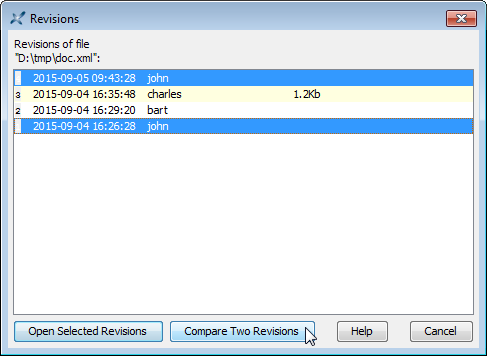
The comparison of revisions is done using the Compare tool. The Compare tool will show you the differences existing between two revisions. It also allows to accept or reject some or all the changes.
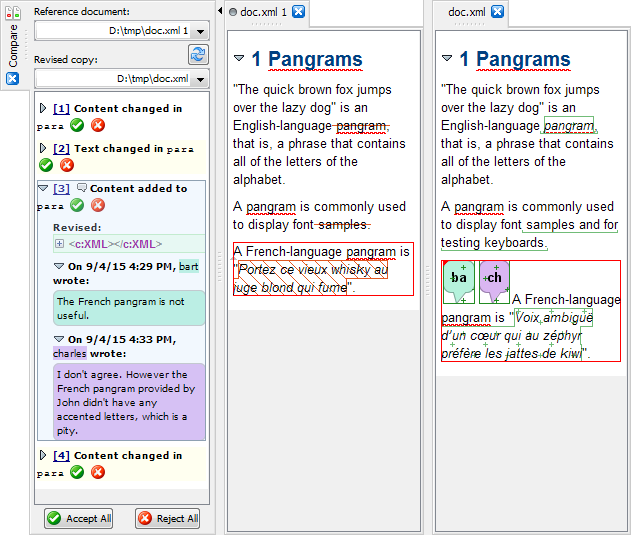
A simple use case
This tool is typically used by an author after her/his
draft document has been reviewed and possibly modified by other authors.
For example, let's suppose that John has finished writing
doc.xml.
John turns on option "Store All Revisions in
the Document" in doc.xml using ToolsRevisionsStore All Revisions in the Document,
saves the document to disk and then sends a copy to Bart.
Bart
modifies doc.xml. He also adds a remark using ToolsRemarkInsert or Edit Remark explaining why
he deleted the last paragraph. This results in creating revision #2 of
doc.xml.
Bart sends his modified copy to Charles, who does
not agree with some of the changes made by Bart. This results in creating
revision #3 of doc.xml.
Finally, John receives a
doc.xml file containing the changes made by Bart and then by
Charles.
Out of curiosity, John uses ToolsRevisionsOpen Revision to take a look at what
Bart has done, that is, revision #2 of doc.xml.
After closing revision #2, John uses ToolsRevisionsOpen Revision one more time. This time, he wants to compare his original work (revision #1; the initial revision) to the document being edited (revision #4; latest one) which contains all the changes made by Bart and Charles.
John accepts all the changes
except those contained in the last paragraph, closes revision #1 and the
Compare tool, turns off option "Store All Revisions in the
Document" and saves doc.xml to disk.
