Converting elements
You have learned in a previous
lesson, Easier editing,
that some toolbar buttons allow to convert the text selection to commonly
used elements such as emphasis, literal,
link, etc. In fact, these buttons all invoke commands based on
 EditConvert (keyboard shortcut:
Ctrl-T, T like Transform). The Convert
command may be applied to the node selection as well as to the text
selection.
EditConvert (keyboard shortcut:
Ctrl-T, T like Transform). The Convert
command may be applied to the node selection as well as to the text
selection.
When a single element is selected , Convert, to make
it simple, allows to change the name of this element. For example, you can
select a note element and convert it to a caution
element. You can select an itemizedlist and convert it to an
orderedlist.
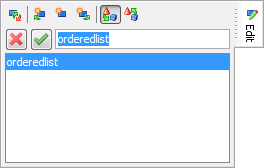
Note that the
Convert command will not let you convert a note to an
example because the content model of a note
element is not compatible with the content model of an example
element (the example element must begin with a
title child element).
When a node range is
selected, Convert allows to wrap this node range into a new element.
For example, if you first select a programlisting and then use
 SelectExtend Selection to Following Sibling
(keyboard shortcut: Esc Right_Arrow) to extend the node selection
to the
SelectExtend Selection to Following Sibling
(keyboard shortcut: Esc Right_Arrow) to extend the node selection
to the calloutlist found after it, you can wrap these two
elements into an informalexample.
What is a node range?
Some of the commands of XMLmind XML Editor (e.g. Paste, Replace, Convert) can be applied to a node range. What we call a node range here is one or more consecutive sibling nodes. A node range may comprise different types of nodes: element, text node, comment, processing-instruction. What counts is that all the nodes have the same parent element and are consecutive.
Now what if you want to wrap a
para into a blockquote? You cannot use
Convert to do that because this command merely changes the name of an
element when a single element is selected. When you need to perform this
kind of task, you'll have to use a variant of command Convert:  EditConvert [wrap] (keyboard shortcut:
Ctrl+Shift-T). Unlike plain Convert, Convert [wrap]
always wraps the selection into a new element.
EditConvert [wrap] (keyboard shortcut:
Ctrl+Shift-T). Unlike plain Convert, Convert [wrap]
always wraps the selection into a new element.

