 |
  |
 |
|
|
|
 |
Note
|
| Parameter | Value | Description | ||
| appendix-number-format |
Allowed values are: 'I', 'i',
'A', 'a', '1'.
Default value:
'A'.
|
The number format of topics referenced in a bookmap as
appendix. By default, such topics are numbered as follows:
Appendix A. Title of first appendix, Appendix
B. Title of second appendix, etc.
|
||
| cause-number-format |
Allowed values are: 'I', 'i',
'A', 'a', '1'.
Default value:
'A'.
|
In a
<troubleshooting> topic,
multiple <remedy> elements having no title
are given numbers formatted using this format. |
||
| center |
List of element names separated by
whitespace.
Example: 'fig equation-figure simpletable
table'.
Default value: ''.
|
Specifies which elements are to be centered horizontally
on the page.
|
||
 ditacListsURI ditacListsURI |
URL(1).
Default value:
output_dir/ditac_lists.ditac_lists.
|
The URL of file
ditac_lists.ditac_lists. |
||
| equation-number-after |
String.
Default value: ')'.
|
Text added after the contents of a
<equation-number> element. |
||
| equation-number-before |
String.
Default value: '('.
|
Text added before the contents of a
<equation-number> element. |
||
| extended-toc |
Allowed values are: 'frontmatter',
'backmatter', 'both',
'none'.
Default value: 'none'.
|
Allows to add
<frontmatter> and
<backmatter>
<topicref>s to the Table of Contents
(TOC) of a document.Note that the
@toc,
@navtitle, @locktitle, etc,
attributes are applied normally to
<frontmatter> and
<backmatter>
<topicref>s when an extended TOC is
generated. |
||
| external-resource-base |
Allowed values are: '', an URL ending with
"/" or '#REMOVE'.
|
Specifies how to resolve
<xref>
or <link> elements having an external
@scope attribute and a relative
@href attribute. Example of such
<xref> elements: <xref
scope="external" format="java"
href="src/Test.java">Test.java</xref>.
|
||
| highlight-source |
Allowed values are: 'yes' and
'no'.
Default value: 'yes'.
|
By default, syntax highlighting is
turned on for all elements specializing
<pre>
and having an @outputclass attribute equals to
language-c, language-cpp,
language-csharp, language-delphi,
language-ini, language-java, language-javascript,
language-m2, language-perl, language-php,
language-python, language-ruby,
language-tcl. |
||
| index-range-separator |
String.
Default value: '–' (EN
DASH).
|
The string used to separate the first page number from
the last page number in a page range of an indexed term. Example:
index-range-separator='<-->':
C Cat 54, 87<-->90 |
||
| link-auto-text |
List of values separated by whitespace. Allowed values
are: 'number' and 'text'.
Default value:
'number text'.
|
This parameter specifies which text to generate for a
<link> element, when this
<link> element has no
<linktext> child element or when this
<linktext> child element is
empty.Similar to above parameter xref-auto-text but for
<link> elements. |
||
| note-icon-list |
List of type attribute values separated by
whitespace.
Default value: 'attention caution danger
fastpath important note notes remember restriction
tip'.
|
Specifies the type (attribute
@type) of
the <note> elements for which icons should be
used rather than text in order to represent note
labels.Ignored unless
use-note-icon='yes'.
|
||
| number |
List of values separated by whitespace. Allowed values
are: 'topic', 'chapter-only', 'table',
'fig', 'example', 'equation-figure',
'all'.
Default value: '' (number
nothing).
|
Specifies which elements are to be numbered.
'all' is a short form for 'topic table fig
equation-figure'.
'chapter-only' means: number
topics, but only those referenced in a bookmap as
<part>, <chapter> and
<appendix>.
|
||
| number-separator1 |
String.
Default value: '.'.
|
The string used to separate the hierarchical number of
topics acting as sections.
|
||
| number-separator2 |
String.
Default value: '-'.
|
The string used to separate the hierarchical number of
figures, tables, examples and equations.
When possible, the
number of figure, table, example or equation is made relative to the
number of the ancestor chapter or appendix. This gives for example
(for descendants of chapter 5): Figure 5-1. Title of first
figure of chapter 5, Figure 5-2. Title of second
figure of chapter 5, etc.
|
||
| mark-important-steps |
Allowed values are: 'yes' and
'no'.
Default value: 'no'.
|
Generates a "Required" (respectively "Optional") label for
<step> and <substep>
elements having an @importance attribute set to
"required" (resp. "optional"). |
||
| part-number-format |
Allowed values are: 'I', 'i',
'A', 'a', '1'.
Default value:
'I'.
|
The number format of topics referenced in a bookmap as
part. By default, such topics are numbered as follows:
Part I. Title of first part, Part II. Title
of second part, etc.
|
||
| prepend-chapter-to-section-number |
Allowed values are: 'yes' and
'no'.
Default value: 'no'.
|
Normally topics which are descendants of chapters (that
is, topics referenced in a bookmap as
<chapter>) are numbered as follows: 1.
Title of first section, 1.1. Title of first
subsection, etc.Specifying
prepend-chapter-to-section-number='yes' prepends the number
of the chapter ancestor to the section number. This gives for
example (for descendants of chapter 5): 5.1. Title of
first section, 5.1.1. Title of first subsection,
etc.
|
||
| remedy-number-format |
Allowed values are: 'I', 'i',
'A', 'a', '1'.
Default value:
'A'.
|
In a
<troubleshooting> topic,
multiple <remedy> elements having no title
are given numbers formatted using this format. |
||
| show-draft-comments |
Allowed values are: 'yes' and
'no'.
Default value: 'no'.
|
Specifies whether
<draft-comments> elements should be
rendered. |
||
| troubleSolution-number-format |
Allowed values are: 'I', 'i',
'A', 'a', '1'.
Default value:
'1'.
|
In a
<troubleshooting> topic,
multiple <troubleSolution> elements having no
title are given numbers formatted using this format. |
||
| title-after |
List of element names separated by
whitespace.
Example: 'fig equation-figure
table'.
Default value: ''.
|
Specifies which elements should have their titles
displayed after their bodies.
|
||
| title-page |
Allowed values are: 'auto', 'none' or
the URI of a custom title page.
Default value:
'auto'.
|
Specifies the kind of ``title page'' (contains the title
of the document, its author, etc) to be generated before the actual
contents of the document.
|
||
| title-prefix-separator1 |
String.
Default value: '.
'.
|
The string used to separate the number of an formal
object from its title.
|
||
| use-note-icon |
Allowed values are: 'yes' and
'no'.
Default value: 'no'.
|
Specifies whether icons should be used rather than text
in order to represent the label of a
<note>
element. |
||
| watermark-image |
URI. If the URI is relative, it is relative to the
current working directory of the user.
No default
value.
|
Specifies an image file which is to be used as a
watermark in all the pages comprising the output document. See also
parameter watermark.
|
||
| xref-auto-text |
List of values separated by whitespace. Allowed values
are: 'number' and 'text'.
Default value:
'number'.
|
This parameter specifies which text to generate for an
<xref> element, when this
<xref> element contains no text at
all(2).Let's suppose that an
<xref> element containing no text at all
points to a topic titled "Installation".Because the
<xref> element points to an element having a
<title> child element, ditac may use this
title as a starting point for the generated text.Now let's
suppose that topics are numbered and that the number of the
"Installation" topic is "Chapter 5".
The
text generated for this
<xref> element is
thus:
Note that this specification is just a hint because ditac
needs anyway to generate some text. For example, if topics are not
numbered and xref-auto-text='number', the generated text
will be "Installation".
For XSL-FO based output
formats, see also parameter show-xref-page.
|
||
 xsl-resources-directory xsl-resources-directory |
URL. A relative URL is relative to the output
directory.
Default value: 'resources/' resolved
against the directory which contains the XSLT
stylesheets.
|
Most XSLT stylesheets generate files which reference
resources such as icons or CSS stylesheets. This parameter specifies
the target directory which is to contain such resources.
If
this directory does not exist, it is automatically created.
If
this directory does not already contain the resources needed by the
XSLT stylesheets, such resources are automatically copied to this
directory.
The default value of this parameter is something
like
file:/opt/ditac/xsl/xhtml/resources/ for
the stylesheets generating XHTML. URL
file:/opt/ditac/xsl/xhtml/resources/ specifies
an existing directory containing basic.css,
note.png, important.png,
etc. This means that by default, no directory is created and no
resource is copied.If the value of this parameter is an
absolute URI, then ditac assumes that no resource directory is to be
created and no resource is to be copied because this has already
been done by the user.
|
| Parameter | Value | Description | ||
| add-copiable-links |
List of values separated by whitespace. Allowed values
are: 'topic', 'table', 'fig',
'equation-figure', 'example', section',
'all' (equivalent to 'topic table fig equation-figure
example section').
Default value: '' (do not add
copiable links).
|
Adds a copiable link to the
<title> child elements of specified “formal
elements”.
This automatically generated link to a formal element is
intended to be copied using the "Copy Link"
entry found in the contextual menu of all web browsers in order to
be shared with others. For example, send this link by
email.
|
||
| add-index-toc |
Allowed values are: 'yes' and
'no'.
Default value: 'yes'.
|
Specifies whether an A-Z list should be added at the
beginning of the back-of-the-book index.
|
||
| chain-pages |
Allowed values are: 'none', 'top',
'bottom' or 'both'.
Default value:
'none'.
|
Specifies whether a header and/or a footer containing
navigation icons should be generated in order to link together all
the HTML pages.
|
||
| chain-topics |
Allowed values are: 'yes' and
'no'.
Default value: 'no'.
|
Specifies whether navigation icons should be generated
in order to link together all the topics.
See also related
parameter: ignore-navigation-links.
|
||
| css |
URL.
Default value: ''.
|
Low-level parameter specifying which CSS stylesheet to
use to style the generated (X)HTML pages.
When neither
css nor custom-css is specified, the
default CSS stylesheet being used is xsl-resources-directory/base.css.
|
||
| cssResourceName |
URL basename relative to the directory specified by
parameter xsl-resources-directory.
Default
value: 'base.css'.
|
Very low-level parameter specifying which CSS stylesheet
to use. This CSS stylesheet is expected to be found in the resources
directory.
|
||
| custom-css |
URL.
Default value: ''.
|
Specifies the custom CSS stylesheet used to style the
generated (X)HTML pages. This high-level parameter has priority over
low-level parameter css.
This custom CSS stylesheet
is copied to directory xsl-resources-directory.
Therefore custom-css requires directory
xsl-resources-directory to be specified as an URL which is
relative to the output directory (e.g.
xsl-resources-directory='res').
How to use
custom-css is explained in Part II, Chapter 9, Section 1.
|
||
| default-table-width |
A percentage, typically something like '100%'
or '90%'.
Default value: '' (as narrow as
possible).
|
The default width of
<table> and
<simpletable> elements. |
||
| external-link-icon-height |
Length. A length may have a unit. Default is
px.
Default value: '10'.
|
The height of the “opens in new window”
icon.
|
||
| external-link-icon-name |
Basename.
Default value:
'new_window.png'.
|
The basename of the “opens in new window” icon. This
icon is found in the resources directory.
|
||
| external-link-icon-width |
Length. A length may have a unit. Default is
px.
Default value: '10'.
|
The width of the “opens in new window”'
icon.
|
||
| format-to-type |
Zero or more DITA format/MIME type pairs. Example:
"txt text/plain xml application/xml html text/html".
Default value: '', which means that DITA
xref/@format is not converted to XHTML
a/@type.
|
Allows to map DITA xref/@format to XHTML
a/@type.
Using default empty value, <xref
scope="external" format="txt"
href="http://acme.com/info.xyz"> is converted to <a
href="http://acme.com/info.xyz" target="_blank">. The fact
that file extension ".xyz" is unknown may cause problems
when attempting to navigate or download file "info.xyz"
using a Web browser.
If
-p format-to-type "txt text/plain" is passed to
ditac then <xref scope="external"
format="txt" href="http://acme.com/info.xyz"> is converted
to <a type="text/plain" href="http://acme.com/info.xyz"
target="_blank">, which is better. |
||
| generator-info |
String
Default value: 'XMLmind DITA Converter
VERSION'.
|
The name of the software which has been used to create
the HTML pages.
Specify an empty string if you don't want to
have a <meta name="generator" content="XXX"/>
element added to your HTML pages.
|
||
| ignore-navigation-links |
Allowed values are: 'yes', 'no' and
'auto'.
Default value: 'auto' for XHTML and
its variants; 'yes' for Web Help, HTML Help, Eclipse Help
and EPUB
|
If 'yes', do not generate the navigation links
corresponding to topicref attribute
@collection-type.If 'no', generate
the navigation links corresponding to topicref attribute
@collection-type.If 'auto', generate
the navigation links corresponding to topicref attribute
@collection-type, unless chain-topics=yes. |
||
| javascripts |
String. List of URLs separated by
whitespace.
Default value: ''.
|
The URLs specified in this parameter must point to
JavaScript files. These URLs are converted to
<script> XHTML elements added to the
<html>/<head> elements
of the XHTML files generated by ditac.Note that an URL may
end with ';async', ';defer' or a combination of
both flags. These flags are translated to the corresponding
attributes of the
<script> element.
Example:https://cdn.jsdelivr.net/npm/¬ mathjax@3/es5/tex-mml-chtml.js;async is translated to:
<script type="text/javascript" src="https://cdn.jsdelivr.net/npm/¬ mathjax@3/es5/tex-mml-chtml.js" async="async"></script> |
||
| mathjax |
Allowed values are: 'yes', 'no' and
'auto'.
Default value: 'no'.
|
MathJax
 is a
JavaScript display engine for mathematics that works in all
browsers.Though a number of web browsers natively support embedded
MathML, it's recommended to specify parameter mathjax=yes
or mathjax=auto to let MathJax render embedded MathML found
in the generated XHTML 5 and XHTML 5 Web Help files. is a
JavaScript display engine for mathematics that works in all
browsers.Though a number of web browsers natively support embedded
MathML, it's recommended to specify parameter mathjax=yes
or mathjax=auto to let MathJax render embedded MathML found
in the generated XHTML 5 and XHTML 5 Web Help files.
Ignored by all XHTML-based formats but XHTML and Web
Help.
|
||
| mathjax-url |
String.
Default value: the URL pointing to a
MathJax CDN, as recommended in the MathJax
documentation.
|
Ignored unless parameter
mathjax is set to
'yes'or 'auto'.
|
||
| mark-external-links |
Allowed values are: 'yes' and
'no'.
Default value: 'no'.
|
Specifies whether an external link should be marked
using a “opens in new window” icon.
|
||
| navigation-icon-height |
Length. A length may have a unit. Default is
px.
Default value: '16'.
|
The height of a navigation icon.
|
||
| navigation-icon-suffix |
String.
Default value:
'.png'.
|
The suffix of a navigation icon.
The root names of
navigation icons are fixed:
For example, if note-icon-suffix='.svg', the
default resources directory is expected to contain
first.svg,
first_disabled.svg,
last.svg, etc.In principle, there is no
need for an end-user to specify any of the
navigation-icon-suffix, navigation-icon-width or
navigation-icon-height parameters.
|
||
| navigation-icon-width |
Length. A length may have a unit. Default is
px.
Default value: '16'.
|
The width of a navigation icon.
|
||
| screen-resolution |
Positive integer.
Default value:
'96'.
|
The resolution of the screen in dot per inch (DPI). This
resolution is used to convert image dimensions such as 3cm
to pixels.
|
||
| xhtml-mime-type |
A MIME type without a parameter such as
'text/html', 'application/xhtml+xml',
'application/xml' or the empty string
('').
Default value: see prose.
|
Low-level parameter. Do not change default value unless
you know what you are doing.
|
| Parameter | Value | Description | ||
| add-toc-root |
Allowed values are: 'yes' and
'no'.
Default value: 'yes'.
|
If 'yes', add a pseudo TOC entry, bearing the
title of the document, containing all the actual TOC
entries.
|
||
| number-toc-entries |
Allowed values are: 'yes' and
'no'.
Default value: 'yes' for Web Help,
'no' for the other formats.
|
If 'yes', number the TOC entries. No effect
unless the number parameter
is used to specify that topics should be numbered.
|
| Parameter | Value | Description |
| wh---CSS_VAR_NAME |
String. A valid CSS property value.
No
default.
|
This kind of parameter may be used to override any of
the default values of the CSS variables
specified in any of the
NNtheme.css template files (all found in
ditac_install_dir/whc_template/_wh/). For
example, the main
NNtheme.css template
file:body {
...
--navigation-width: 33%;
...
}
The
wh---navigation-width CSS variable is used as
follows in NNcommon.css, another CSS template
file:#wh-navigation {
...
width: var(--navigation-width);
...
}
Therefore parameter
wh---navigation-width may be
used to give the navigation side of the generated Web Help a
different initial width. Example:
-p wh---navigation-width "25%".More examples
in "XMLmind Web Help Compiler Manual, Getting
started
". |
| wh-collapse-toc |
Allowed values are: 'yes' and
'no'.
Default value: 'no'.
|
Specifies whether the TOC should be initially
collapsed.
|
| wh-favicon |
Filename or absolute URI of an image file. A relative
filename is relative to the current working directory.
|
Specifies the favicon which is to be added
to each page of the Web Help. A favicon is a small
image displayed next to the page title in the browser
tab.
This file is copied to
output_directory/_wh/user/.
|
| wh-index-numbers |
Allowed values are: 'yes' and
'no'.
Default value: 'no'.
|
Specifies whether words looking like numbers are to be
indexed.
Examples of such number-like words: 3.14,
3,14, 3times4equals12, +1, -1.0,
3px, 1,2cm, 100%, 1.0E+6,
1,000.00$.
|
| wh-inherit-font-and-colors |
Allowed values are: 'yes' and
'no'.
Default value: 'yes'.
|
When wh-inherit-font-and-colors is set to
'no', the navigation pane of the generated Web Help uses
fonts and colors of its own, which will generally differ from those
used for the content of the Web Help.
Setting
wh-inherit-font-and-colors to 'yes' lets you use
for the navigation pane the same fonts and colors as those used for
the content of the Web Help.
So basically this parameter is a
shorthand for:
-p wh---navigation-font-family inherit¬
-p wh---navigation-font-size inherit¬
-p wh---navigation-color inherit¬
-p wh---navigation-background-color inherit
See above wh---CSS_VAR_NAME
parameters.
|
| wh-jquery |
Relative or absolute URI. A relative URI is relative to
the URI of a page of the Web Help.
Default value: absolute URI
of the corresponding file found on the Google CDN.
|
Specifies the location of the JavaScript file containing
jQuery
. Example: https://code.jquery.com/¬ jquery-3.7.1.slim.min.js Specifying an "https:" URL is
recommended when the generated Web Help is stored on an HTTPS
server.
|
| wh-local-jquery |
Allowed values are: 'yes' and
'no'.
Default value: 'no'.
|
Specifies whether all jQuery files should be copied to
_wh/jquery/, where _wh/ is
the directory containing the other Web Help files.By default,
the jQuery files are accessed from the Web (typically from a
CDN).
Note that this parameter is applied after jQuery
has been possibly customized using parameter wh-jquery. For
example,
"
-p wh-jquery https://code.jquery.com/jquery-3.7.0.js"
copies a file downloaded from https://code.jquery.com/ to
_wh/jquery/. |
| wh-layout |
The name of a layout.
Default value:
'classic'.
|
Selects a layout for the generated Web Help.
For
now, only 3 layouts are supported: classic, simple
and corporate.
|
| wh-responsive-ui |
Allowed values are: 'yes' and
'no'.
Default value: 'yes'.
|
Specifies whether the generated Web Help should be
“responsive”, that is, whether it should adapt its layout to the
size of the screen.
|
| wh-ui-language |
"browser" or "document" or a language
code conforming RFC
3066
. Examples: de, fr-CA.Default
value: 'browser'.
|
Specifies which language should be used for the messages
(tab labels, button tool tips, etc) of the generated Web
Help.
Default value "browser" means that this
language is the one used by the Web browser for its own messages.
This language may often be specified in the user preferences of the
Web browser.
Value "document" means that the language
of the document should be used.
A language code such as
en, en-US, es, es-AR, etc, may
be used to explicitly specify which language should be
used.
|
| wh-use-stemming |
Allowed values are: 'yes' and
'no'.
Default value: 'yes'.
|
Specifies whether stemming(3) should be used
to implement the search facility. By default, stemming is used
whenever possible, that is,
The main language of the document is specified by the
@xml:lang attribute found on the root element of
DITA map being converted; otherwise using the -lang command-line
option; otherwise, it is assumed to be
"en". |
| wh-user-css |
Filename or absolute URI of a CSS file. A relative
filename is relative to the current working directory.
|
Specifies the user's CSS stylesheet which is to be added
to each page of the Web Help.
This file is copied to
output_directory/_wh/user/.
Sample
user's CSS wh_resources/header_footer.css
as used in
the following example:-p wh-user-header¬ wh_resources/header.html -p wh-user-footer¬ wh_resources/footer.html -p wh-user-css¬ wh_resources/header_footer.css -p wh-user-resources¬ wh_resources/header_footer_files |
| wh-user-footer |
Filename or absolute URI of an XHTML file. A relative
filename is relative to the current working directory.
|
Specifies the user's footer which is to be added to each
page of the Web Help.
The content of the
<body> element of wh-user-footer is
inserted as is in the <div id="wh-footer"> found in
each page of the Web Help.Same remark as for parameter
wh-user-header about the resources referenced by a user's
footer.
Sample user's footer wh_resources/footer.html
as used in the
following example:-p wh-user-header¬ wh_resources/header.html -p wh-user-footer¬ wh_resources/footer.html -p wh-user-css¬ wh_resources/header_footer.css -p wh-user-resources¬ wh_resources/header_footer_files More examples in "XMLmind Web Help Compiler Manual, Getting
started
". |
| wh-user-header |
Filename or absolute URI of an XHTML file. A relative
filename is relative to the current working directory.
|
Specifies the user's header which is to be added to each
page of the Web Help.
The content of the
<body> element of wh-user-header is
inserted as is in the <div id="wh-header"> found in
each page of the Web Help.If a user's header references
resources (e.g. image files), then these resources must either be
referenced using absolute URLs or these resources must be found in a
user's resource directory and parameter wh-user-resources
must be specified.
Example:
Sample user's header wh_resources/header.html
as used in the
following example:-p wh-user-header¬ wh_resources/header.html -p wh-user-footer¬ wh_resources/footer.html -p wh-user-css¬ wh_resources/header_footer.css -p wh-user-resources¬ wh_resources/header_footer_files More examples in "XMLmind Web Help Compiler Manual, Getting
started
". |
| wh-user-resources |
Filename or absolute "file:" URI of a
directory. URI schemes other than "file" (e.g.
"http") are not supported for this parameter. A relative
filename is relative to the current working directory.
|
Specifies a user's resource directory which is to be
recursively copied to
output_directory/_wh/user/.
This directory
typically contains image files referenced by the user's header,
footer or CSS stylesheet.
Sample user's resource directory
wh_resources/header_footer_files/
as used in
the following example:-p wh-user-header¬ wh_resources/header.html -p wh-user-footer¬ wh_resources/footer.html -p wh-user-css¬ wh_resources/header_footer.css -p wh-user-resources¬ wh_resources/header_footer_files More examples in "XMLmind Web Help Compiler Manual, Getting
started
". |
| whc-index-basename |
URL basename.
Default value:
'whc_index.xml'.
|
Basename of the Index XML input file of XMLmind Web Help
Compiler.
In principle, there is no need for an end-user to
specify this parameter.
|
| whc-toc-basename |
URL basename.
Default value:
'whc_toc.xml'.
|
Basename of the TOC XML input file of XMLmind Web Help
Compiler.
In principle, there is no need for an end-user to
specify this parameter.
|
| Parameter | Value | Description |
| cover-image |
URI. If the URI is relative, it is relative to the
current working directory of the user.
No default
value.
|
Specifies an image file which is to be used as the cover
page of the EPUB file. This image must be a PNG or JPEG image. Its
size must not exceed 1000x1000 pixels.
|
| epub-identifier |
String
Default value: dynamically generated UUID
URN.
|
A globally unique identifier for the generated EPUB
document (typically the permanent URL of the EPUB
document).
|
| epub2-compatible |
Allowed values are: 'yes' and
'no'.
Default value: 'yes'.
|
By default, the EPUB 3 files generated by
ditac are made compatible with EPUB 2 readers. Specify 'no'
if you don't need this compatibility.
|
, RenderX XEP , Antenna House XSL Formatter or XMLmind
XSL-FO Converter . |
Tip |
| Parameter | Value | Description |
| base-font-size |
Default value: '10pt'.
|
The size of the ``main font'' of the document. All the
other font sizes are computed relatively to this font
size
|
| body-bottom-margin |
Length.
Default value:
'0.5in'.
|
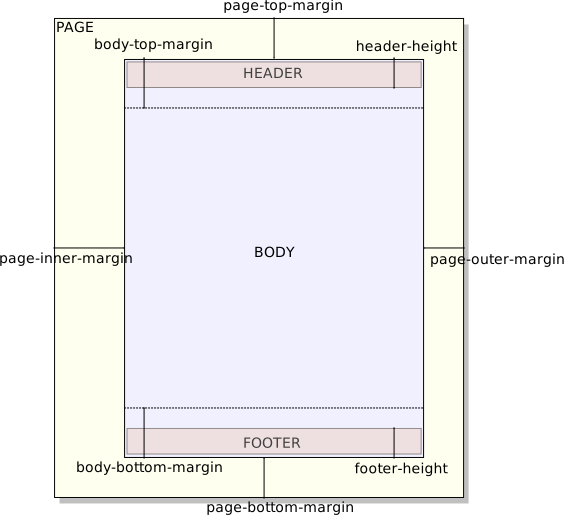
See Figure 4-1
below.
|
| body-font-family |
A string containing one or more font families separated
by commas.
Default value: 'serif'.
|
Specifies the family of the font used for the text of
all elements except topic titles.
|
| body-start-indent |
Length.
Default value:
'2pc'.
|
Applies only to alternate XSLT stylesheet
ditac_install_dir/xsl/fo/fo_indent.xsl.
This
stylesheet:
This stylesheet is invoked by passing option
-t ditac-xsl:fo/fo_indent.xsl to
ditac. Example of its output: manual-fop.pdf . |
| body-top-margin |
Length.
Default value:
'0.5in'.
|
See Figure 4-1
below.
|
| choice-bullets |
A string containing one or more single characters
separated by whitespace.
Default value: '•'
(BULLET).
|
Specify which bullet character to use for a
<choice> element. Additional characters are
used for nested <choice>
elements.Changing the value of this parameter may imply
changing the font-family attribute of the attribute-set
choice-label.
|
| equation-block-equation-width |
Length.
Default value:
'90%'.
|
In a numbered <equation-block>
element, this parameter specifies the width of the column containing
the equation. |
| equation-block-number-width |
Length.
Default value:
'10%'.
|
In a numbered <equation-block>
element, this parameter specifies the width of the column containing
the <equation-number> element. |
| external-href-after |
String.
Default value: ']'.
|
Appended after the external URL referenced by an
<xref> or <link>
element. Ignored unless
show-external-links='yes'. |
| external-href-before |
String.
Default value: '
['.
|
Separates the text of an
<xref>
or <link> element from its referenced
external URL. Ignored unless
show-external-links='yes'. |
| foProcessor |
String. Examples: 'FOP', 'XEP',
'AHF', 'XFC'.
Default value:
''.
|
The name of the XSL-FO processor used to convert the
XSL-FO file generated by the XSLT stylesheets to the target output
format.
|
| footer-center |
String.
|
Specifies the contents of the central part of a page
footer. See Specifying a header or a
footer.
Supports
a conditional
specification.
Default value:
two-sides even:: {{chapter-title}};;
two-sides part||chapter||appendices||appendix odd::¬
{{section1-title}};;
one-side:: {{chapter-title}}
|
| footer-center-width |
String representing an integer larger than or equal to
1.
Default value: '6'.
|
Specifies the proportional width of the central part of
a page footer. See Specifying a header or a
footer.
Supports
a conditional
specification.
|
| footer-height |
Length.
Default value:
'0.4in'.
|
See Figure 4-1
below.
|
| footer-left |
String.
|
Specifies the contents of the left part of a page
footer. See Specifying a header or a
footer.
Supports
a conditional
specification.
Default value:
two-sides even:: {{page-number}}
|
| footer-left-width |
String representing an integer larger than or equal to
1.
Default value: '2'.
|
Specifies the proportional width of the left part of a
page footer. See Specifying a header or a
footer.
Supports
a conditional
specification.
|
| footer-right |
String.
|
Specifies the contents of the right part of a page
footer. See Specifying a header or a
footer.
Supports
a conditional
specification.
Default value:
two-sides first||odd:: {{page-number}};;
one-side:: {{page-number}}
|
| footer-right-width |
String representing an integer larger than or equal to
1.
Default value: '2'.
|
Specifies the proportional width of the right part of a
page footer. See Specifying a header or a
footer.
Supports
a conditional
specification.
|
| footer-separator | Allowed values are: 'yes' and
'no'.
Default value: 'yes'.
|
Specifies whether an horizontal rule should be drawn
above the page footer.
|
| header-center |
String.
Default value:
'{{document-title}}'.
|
Specifies the contents of the central part of a page
header. See Specifying a header or a
footer.
Supports
a conditional
specification.
|
| header-center-width |
String representing an integer larger than or equal to
1.
Default value: '6'.
|
Specifies the proportional width of the central part of
a page header. See Specifying a header or a
footer.
Supports
a conditional
specification.
|
| header-height |
Length.
Default value:
'0.4in'.
|
See Figure 4-1
below.
|
| header-left |
String.
Default value: ''.
|
Specifies the contents of the left part of a page
header. See Specifying a header or a
footer.
Supports
a conditional
specification.
|
| header-left-width |
String representing an integer larger than or equal to
1.
Default value: '2'.
|
Specifies the proportional width of the left part of a
page header. See Specifying a header or a
footer.
Supports
a conditional
specification.
|
| header-right |
String.
Default value: ''.
|
Specifies the contents of the right part of a page
header. See Specifying a header or a
footer.
Supports
a conditional
specification.
|
| header-right-width |
String representing an integer larger than or equal to
1.
Default value: '2'.
|
Specifies the proportional width of the right part of a
page header. See Specifying a header or a
footer.
Supports
a conditional
specification.
|
| header-separator | Allowed values are: 'yes' and
'no'.
Default value: 'yes'.
|
Specifies whether an horizontal rule should be drawn
below the page header.
|
| hyphenate |
Allowed values are: 'yes' and
'no'.
Default value: 'no'.
|
Specifies whether words may be hyphenated.
|
| index-column-count |
Positive integer.
Default value:
'2'.
|
The number of columns of index pages.
|
| index-column-gap |
Length.
Default value:
'2em'.
|
The distance which separates columns in index
pages.
|
| justified |
Allowed values are: 'yes' and
'no'.
Default value: 'no'.
|
Specifies whether text (e.g. in paragraphs) should be
justified (that is, flush left and right) or just left aligned (that
is, flush left and ragged right).
|
| link-bullet |
A string containing a single character.
Default
value: '•' (BULLET).
|
Specify which character is inserted before the text of a
<link> element.Changing the value of
this parameter may imply changing the font-family attribute
of the attribute-set link-bullet.
|
| menucascade-separator |
A string containing a single character.
Default
value: '→' (RIGHTWARDS ARROW).
|
Specify which character is used to separate the child
elements of a
<menucascade>
element.Changing the value of this parameter may imply
changing the font-family attribute of the attribute-set
menucascade-separator.
|
| note-icon-height |
Length. A length may have a unit. Default is
px.
Default value: '32'. '7mm' for
the XSLT stylesheets that generate XSL-FO.
|
The height of a note icon.
|
| note-icon-suffix |
Default value: '.png'.
|
The suffix of a note icon.
The root name of a note
icon should be identical to the value of the
@type
attribute it represents. For example, if
note-icon-suffix='.svg', the default resources directory is
expected to contain note.svg,
important.svg,
caution.svg, etc.In principle, there is
no need for an end-user to specify any of the
note-icon-suffix, note-icon-width or
note-icon-height parameters.
|
| note-icon-width |
Length. A length may have a unit. Default is
px.
Default value: '32'. '7mm' for
the XSLT stylesheets that generate XSL-FO.
|
The width of a note icon.
|
| page-bottom-margin |
Length.
Default value:
'0.5in'.
|
See Figure 4-1
below.
|
| page-height |
Length. Example: '297mm'.
Default value: depends
on paper-type.
|
The height of the printed page.
|
| page-inner-margin |
Length.
Default value: if parameter
two-sided is specified as 'yes' then
'1.25in' otherwise '1in'.
|
See Figure 4-1
below.
|
| page-orientation |
Allowed values are: 'portrait' and
'landscape'.
Default value:
'portrait'.
|
The orientation of the printed page.
|
| page-outer-margin |
Length.
Default value: if parameter
two-sided is specified as 'yes' then
'0.75in' otherwise '1in'.
|
See Figure 4-1
below.
|
| page-ref-after |
String.
Default value: ''.
|
Appended after the page number pointed to by an
<xref> or <link>
element. Ignored unless show-xref-page='yes' or
show-link-page='yes'.When both
page-ref-after and page-ref-before are specified
as the empty string, in fact, this specifies that the generated
string must be the localized equivalent of "on
page".
|
| page-ref-before |
String.
Default value: ''.
|
Separates the text of an
<xref>
or <link> element from the page number it
points to. Ignored unless show-xref-page='yes' or
show-link-page='yes'. |
| page-top-margin |
Length.
Default value:
'0.5in'.
|
See Figure 4-1
below.
|
| page-width |
Length. Example: '8.5in'.
Default value: depends
on paper-type.
|
The width of the printed page.
|
| paper-type |
Allowed values are: 'Letter', 'Legal',
'Ledger', 'Tabloid', 'A0', 'A1',
'A2', 'A3', 'A4', 'A5',
'A6', 'A7', 'A8', 'A9',
'A10', 'B0', 'B1', 'B2',
'B3', 'B4', 'B5', 'B6',
'B7', 'B8', 'B9', 'B10',
'C0', 'C1', 'C2', 'C3',
'C4', 'C5', 'C6', 'C7',
'C8', 'C9', 'C10'
(case-insensitive).
Default value:
'A4'.
|
A convenient way to specify the size of the printed
page.
It is also possible to specify a custom paper type by
ignoring the paper-type parameter and directly specifying the page-width and page-height
parameters.
|
| pdf-outline |
Allowed values are: 'yes' and
'no'.
Default value: 'no'.
|
Specifies whether PDF bookmarks should be generated.
Supported by the 'XEP' , 'FOP' and
'AHF' XSL-FO processors. Not relevant, and thus ignored by
'XFC'.
|
| show-external-links |
Allowed values are: 'yes' and
'no'.
Default value: 'no'.
|
Specifies whether the external URL referenced by
an
<xref> or <link>
element should be displayed right after the text contained by this
element.Example: show-external-links='yes'causes
<xref
href="http://www.oasis-open.org/">Oasis</xref> to be
rendered as follows:
Oasis [http://www.oasis-open.org/].
|
| show-imagemap-links |
Allowed values are: 'yes' and
'no'.
Default value: 'yes'.
|
Specifies whether a numbered list should be generated
for an
<imagemap> element, with one list item
per <area> element.A list item
contains the link specified by the
<area>
element. No list items are generated for “dead areas”
(<area> elements specifying no link at
all). |
| show-link-page |
Allowed values are: 'yes' and
'no'.
Default value: 'no'.
|
Same as show-xref-page but for
<link> elements. |
| show-xref-page |
Allowed values are: 'yes' and
'no'.
Default value: 'no'.
|
Specifies whether the page number corresponding to the
internal link target referenced by an
<xref> element should be displayed right
after the text contained by this element.Example:
show-xref-page='yes'causes <xref
href="introduction.dita">Introduction</xref> to be
rendered as follows: Introduction [3].
|
| title-color |
A string representing a color.
Default value:
'black'.
|
Specifies the color used for the text of topic (of any
kind) titles.
|
| title-font-family |
A string containing one or more font families separated
by commas.
Default value: 'sans-serif'.
|
Specifies the family of the font used for the text of
topic (of any kind) titles.
|
| two-sided |
Allowed values are: 'yes' and
'no'.
Default value: 'no'.
|
Specifies whether the document should be printed double
sided.
|
| ul-li-bullets |
A string containing one or more single characters
separated by whitespace.
Default value: '•
–' (BULLET, EN DASH).
|
Specify which bullet character to use for an
<ul>/<li> element.
Additional characters are used for nested
<li> elements.For example, if
ul-li-bullets="* - +", "*" will be used for
<ul>/<li> elements,
"-" will be used for
<ul>/<li> elements
contained in a
<ul>/<li> element and
"+" will be used for
<ul>/<li> elements
nested in two
<ul>/<li>
elements.Changing the value of this parameter may imply
changing the font-family attribute of the attribute-set
ul-li-label.
|
| unordered-step-bullets |
A string containing one or more single characters
separated by whitespace.
Default value: '•'
(BULLET, EN DASH).
|
Specify which bullet character to use for a
<steps-unordered>/<step>
element. Additional characters are used for nested
<steps-unordered>/<step>
elements.Changing the value of this parameter may imply
changing the font-family attribute of the attribute-set
unordered-step-label.
|
| watermark |
Allowed values are one or more of 'blank',
'title', 'toc', 'booklist',
'frontmatter', 'body', 'backmatter',
'index', 'all' separated by
whitespace.
Default value: 'all'.
|
Specifies which pages in the output document are to be
given a watermark.
By default, all pages are given a
watermark. If for example, parameter watermark is set to
'frontmatter body backmatter', then only the pages which
are part of the front matter, body and back matter of the output
document are given a watermark. The title page, TOC pages, etc, are
not given a watermark.
No effect unless parameter watermark-image
is specified.
|
| xfc-render-as-table |
A string containing zero or more DITA element names
separated by whitespace.
Default value:
'note'.
|
Specifies whether XMLmind
XSL-FO Converter
should render the <fo:block>s representing
specified DITA elements as
<fo:table>s.This parameter enables a
workaround for a limitation of XMLmind XSL-FO Converter: a
<fo:block> having a border and/or background
color and containing several other blocks, lists or tables is very
poorly rendered in RTF, WML, DOCX and ODT. |
‣ Parent topic: Part I. Using XMLmind DITA Converter
| (1) | Unlike a filename, an URL must contain properly quoted characters. For example, do not specify 'Hello world.htm', instead specify 'Hello%20world.htm'. |
| (2) | This implies that the xref-auto-text parameter is
ignored when an <xref> element contains some
text. |
| (3) | In linguistic morphology and information retrieval, stemming is the process of reducing inflected (or sometimes derived) words to their word stem, base or root form—generally a written word form. |
|
|
|

