Inserting special characters
There are 3 ways to insert in an XML document characters other than letters, digits and common punctuation signs:
- Directly type the special character (if this is possible) or copy
it from a third-party application (such as Windows Character
Map utility), then paste it in the XML document.
Note that the non-breaking space (Unicode code point:
U+00A0; corresponds to well-known character entity ), which is very commonly used, comes with its own keyboard shortcut: Ctrl-Space. Also notice that XMLmind XML Editor represents the non-breaking space as a small dot a little above the baseline of a text line. That is, this character has been made visible.
- Click on the character displayed in a character palette of the
Characters tool.
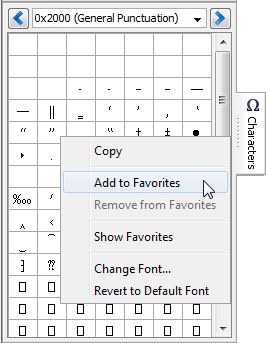
Because searching the same characters over and over in the Characters tool can be a daunting task, this tool has a Favorites palette. In order to add a character to the Favorites palette, right-click on it and then select item "Add to Favorites" in the popup menu.
- Type Esc n (that is, press
Esc then press n;
n like name) to display this dialog box:
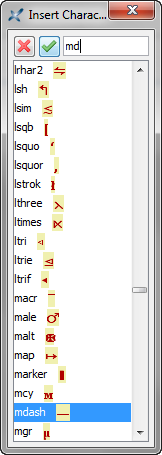
Then type the name of a well-known character entity (
mdash,rarr, etc). The text field of this dialog box supports auto-completion, therefore suffice to type the first few characters of the entity name.The command invoked by the above dialog box inserts the character having specified name. It does not insert a character entity. (XMLmind XML Editor offers no way to work with entities.)
After inserting a character using the above dialog box, it's possible to insert it elsewhere simply by pressing Ctrl-A (that is,
 EditRepeat).
Ctrl-A (A like Again) allows to
repeat the last “repeatable command”. Most commands which require the
user to type something or to select an item from a list have been made
repeatable.
EditRepeat).
Ctrl-A (A like Again) allows to
repeat the last “repeatable command”. Most commands which require the
user to type something or to select an item from a list have been made
repeatable.
