Drag and drop
After selecting some text or some nodes, it's possible to drag this selection and drop it elsewhere inside or outside XMLmind XML Editor (XXE for short). Just remember that you'll have to press the Alt key while dragging the selection. Other than this, dragging works as expected.
Now if you drop some text —whether plain text or well-formed XML— inside XMLmind XML Editor, XXE will display a popup menu allowing copy or move this text before, into or after the drop location.
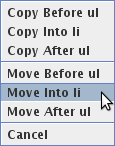
The behavior of XXE
will differ if the text you are dropping can be parsed as an URL (e.g.
file:/C:/Program%20Files/XMLmind_XML_Editor/demo/dita-sample.ditamap)
or is the absolute path of an existing file (e.g.
C:\Program Files\XMLmind_XML_Editor\demo\dita-sample.ditamap):
- If you drop it onto an image placeholder, this will open a dialog box allowing to change the source of the image element. See Inserting images in your document.
- If you drop it onto an external link element (DocBook 5:
link xlink:href="XXX", DocBook 4:ulinkelement, DITA topic:xreforlinkelements, XHTML:a href="XXX"element), this will change the target of the link. - If you drop it anywhere else, this will attempt to open the corresponding XML document in XXE.
