Adding MathML equations
The  toolbar button
allows to add an
toolbar button
allows to add an m:math top-level MathML element to your document.
For now, this button is found in the toolbar only when you open a
DocBook v5+ document, a DITA topic or an XHTML 5 page.
The newly
inserted m:math element contains just an empty
m:mi (math identifier) element. Using the
MathML tool, you'll be able to replace this placeholder by complex
equations without knowing much about the MathML standard.
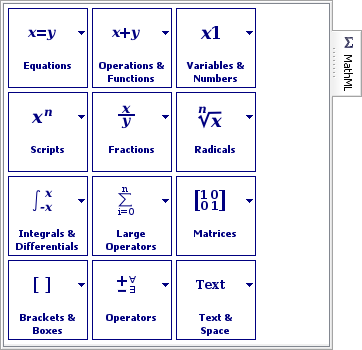
The MathML tool contains a number of palettes. Each palette contains a number of MathML templates.
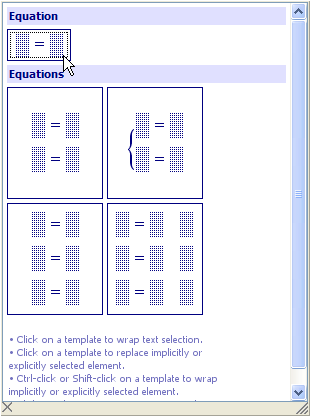
Clicking on a template replaces the explicit or implicit selection (whether it's a text or node selection) by this template. Remember that when there is no explicit text or node selection, the element containing the caret is said to be “implicitly selected”. Therefore, generally, clicking on a template replaces the element containing the caret.
In practice, this means that using
the MathML tool imposes you to construct your equation using a
top-down approach. If you want to write  , you cannot write that naturally, from
left to right. You'll have to first insert the
, you cannot write that naturally, from
left to right. You'll have to first insert the  template, then replace the left
placeholder by a fraction template
template, then replace the left
placeholder by a fraction template  , then replace the right placeholder by
another fraction template and so on. This top-down approach may seem tedious
and slow, but it is also easy to remember and straightforward to
use.
, then replace the right placeholder by
another fraction template and so on. This top-down approach may seem tedious
and slow, but it is also easy to remember and straightforward to
use.
Fortunately, in some cases, there are ways to workaround this top-down approach:
- It's possible to type simple expressions in
m:mi(math identifier) andm:mnelements (math number) and then invoke menu item "Parse Text As MathML"
(keyboard shortcut Ctrl+Shift-SPACE) in order
to parse the expression as MathML. For example, if you can type
"E = m*c^2" and then press Ctrl+Shift-SPACE to let XMLmind
XML Editor do all the hard work for you.
"Parse Text As MathML"
(keyboard shortcut Ctrl+Shift-SPACE) in order
to parse the expression as MathML. For example, if you can type
"E = m*c^2" and then press Ctrl+Shift-SPACE to let XMLmind
XML Editor do all the hard work for you. - If you Ctrl-click (Cmd-click on the Mac) on a template, this will wrap, rather than replace, the explicit or implicit selection (whether it's a text or node selection) in the MathML template clicked upon.
This being said, if you know MathML, you are free to write your equations directly using the Edit and the Attributes tools. Because XMLmind XML Editor natively supports MathML presentation markup, MathML elements are not treated differently than say, a paragraph or a list item.
Let's give it a try
Suppose that you need to insert the
following equation in a DocBook 5 document:  .
.
- Replace the initial empty
m:mi(math identifier) element by clicking on the simplest equation template. - Type "
F" in the left placeholder. - Replace the right placeholder by clicking on the fraction template.
- Type "
G*m_1*m_2" in the numerator of the fraction; press Ctrl+Shift-SPACE to invoke "Parse Text As MathML"; Click in the popup (or press Down then Enter, like for any popup menu) to accept what's suggested in the popup.Notice that character "
*" is translated by "Parse Text As MathML" to what's looks like a smallx. This very common MathML operator is calledInvisibleTimes. This operator is peculiar because normally it's invisible. However for easier editing, XMLmind XML Editor has made it visible. - Type "
d^2" in the denominator of the fraction; press Ctrl+Shift-SPACE to invoke "Parse Text As MathML"; press Down then Enter to accept what's suggested in the popup.Most computer keyboards will allow you to directly type "d2" in the empty denominator of the fraction. This empty denominator is, like all placeholders, an
m:mielement. Don't do that because "d2" is clearly not an identifier. In MathML, "d2" is represented by:<m:msup> <m:mi>d</m:mi> <m:mn>2</mn:mn> </m:msup>
and this is exactly what will be suggested by "Parse Text As MathML" if you type "
d^2" in the denominator of the fraction.
